27
Audit subcategories
All 27 subcategories set to Success and Failure. 22 changed state from defaults. Zero errors.
22 audit subcategories hardened → 96% coverage. 14 previously invisible attack types now produce telemetry. First detection = audit-policy change (Event 4719).
Testbed: 72-core Proxmox with dedicated Wazuh, Splunk, and Grafana VMs. Host coverage: 8/8 (Windows Server 2022).
All 27 subcategories set to Success and Failure. 22 changed state from defaults. Zero errors.
11 ATT&CK techniques moved from undetectable to detectable, including Kerberoasting and SAM dumping.
Full comparison against Microsoft Windows 11 Security Baseline. Zero regressions. 12 intentional additions.
Every subcategory where Microsoft recommends auditing is audited. No baseline requirement is missing.
All enterprise hardening, detection development, and pipeline operations run on a self-hosted Proxmox lab. The infrastructure is purpose-built for reproducible security validation.
72-core dual Xeon E5-2697 v4 · 2 TB RAM · ~96 TB across local/local-lvm/opsvault storage pools · Uptime measured in weeks · Proxmox VE 9.x
| VMID | Hostname | Role |
|---|---|---|
| 100 | HO-FILESERVER-01 | Centralized file server (SMB/NFS) |
| 101 | HO-WAZUH-01 | Wazuh SIEM Manager |
| 102 | HO-GPU-01 | GPU compute (dual Tesla V100) |
| 103 | HO-RUNNER-01 | Self-hosted CI/CD runner |
| 104 | HO-SPLUNK-01 | Splunk Enterprise |
| 120 | HO-GRAFANA-01 | Grafana visualization |
| 130 | HO-HONEYPOT-01 | Honeypot sensor |
| 105 | HO-SECONION-01 | Security Onion (IDS/NSM) — Deploying |
| 9000 | HO-WIN11-TEMPLATE | Windows 11 deployment template |
| 9001 | HO-UBU-TEMPLATE | Ubuntu deployment template |
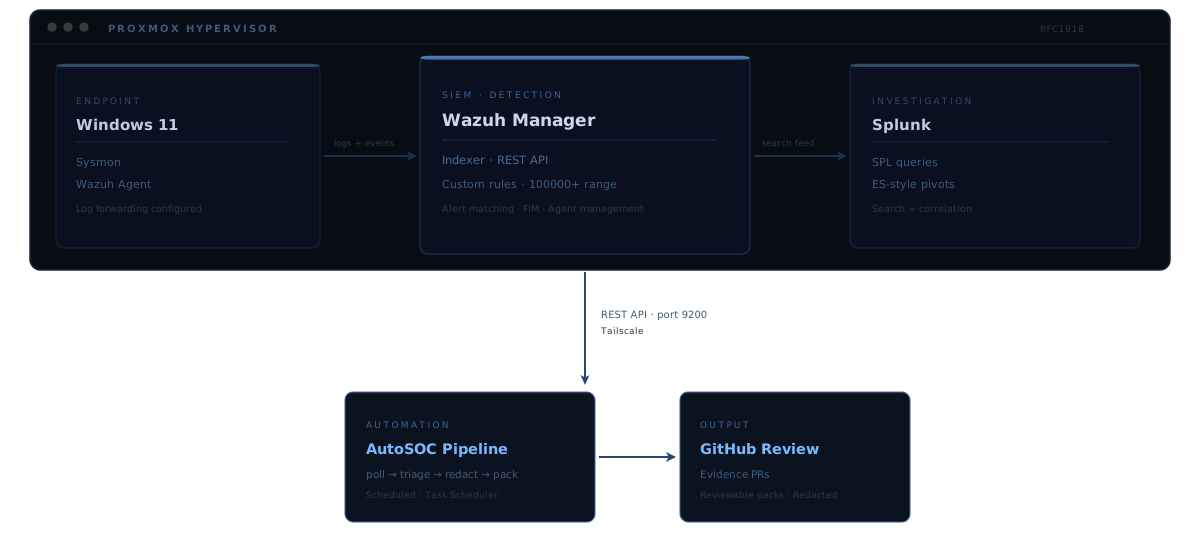
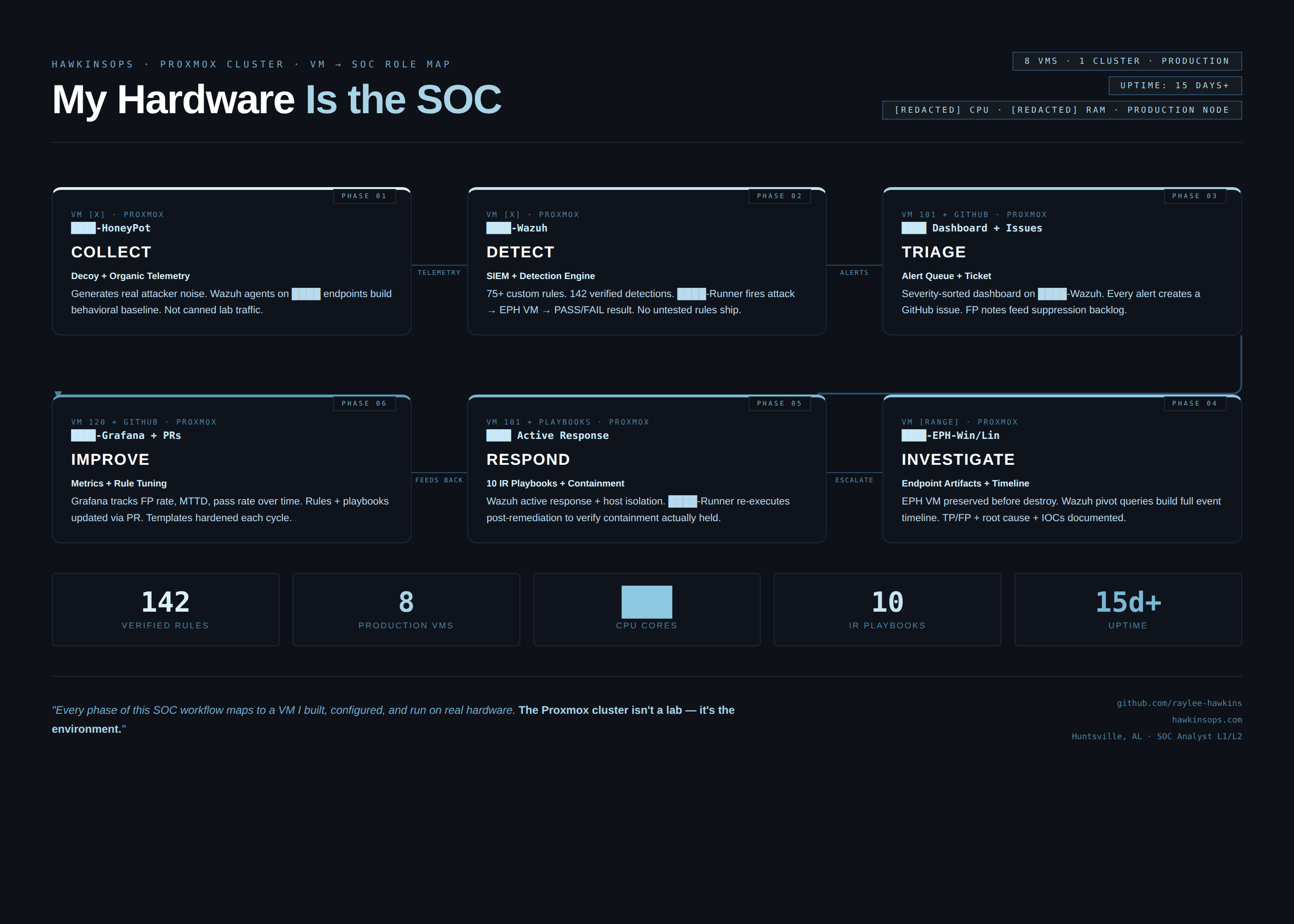
Endpoints run Wazuh agents that forward to HO-WAZUH-01. Wazuh events flow to Splunk (HO-SPLUNK-01) via NFS pipeline for investigation. Grafana (HO-GRAFANA-01) provides dashboard visualization. The full detection-to-escalation pipeline runs across this infrastructure.
Isolated RFC 1918 lab subnet with Tailscale secure mesh for remote access. All traffic stays within the private network boundary.
A structured review of HO-WE-01's Advanced Audit Policy identified 14 subcategories at No Auditing and 8 with only partial coverage. The hardening script set all 27 targeted subcategories to Success and Failure in a single, verified execution.
Kerberoasting, SAM dumping, SSP injection, USB exfiltration, DPAPI credential harvest, registry persistence — all completely invisible. Not low-fidelity. Zero events. 14 categories of attacker activity generating nothing for any tool in the stack.
CommandLine logging was off: every 4688 event showed cmd.exe but never the arguments. Process name without arguments is weak signal.
| Subcategory | Category | Why it matters |
|---|---|---|
| Kerberos Authentication Service | Account Logon | Golden Ticket, AS-REP Roasting undetectable |
| Kerberos Service Ticket Ops | Account Logon | Kerberoasting (T1558.003) undetectable |
| Other Account Logon Events | Account Logon | NTLM fallback not captured |
| Computer Account Management | Account Mgmt | Machine account creation invisible |
| Other Account Mgmt Events | Account Mgmt | Misc account changes not captured |
| Process Termination | Detailed Tracking | Short-lived recon tools vanish |
| DPAPI Activity | Detailed Tracking | Credential Manager access invisible (T1555.004) |
| Other Logon/Logoff Events | Logon/Logoff | RDP reconnect, cached creds missing |
| File System | Object Access | Sensitive file access not logged |
| Registry | Object Access | Run key writes, SAM access invisible |
| SAM | Object Access | Credential dumping (T1003.002) undetectable |
| Removable Storage | Object Access | USB exfiltration (T1052.001) undetectable |
| Sensitive Privilege Use | Privilege Use | SeDebugPrivilege use invisible (T1134) |
| Security System Extension | System | SSP injection (T1547.005) not captured |
| Technique | Tactic | Now |
|---|---|---|
| T1558 — Steal or Forge Kerberos Tickets | Credential Access | Kerberos AS/TGS events visible |
| T1558.003 — Kerberoasting | Credential Access | TGS-REQ/TGS-REP patterns detectable |
| T1555.004 — Windows Credential Manager | Credential Access | DPAPI master key access logged |
| T1003.002 — OS Credential Dumping: SAM | Credential Access | SAM handle opens generate events |
| T1005 — Data from Local System | Collection | File system access on sensitive paths logged |
| T1547.001 — Registry Run Keys | Persistence | Registry write events captured |
| T1052.001 — Exfiltration over USB | Exfiltration | Removable storage events generated |
| T1134 — Access Token Manipulation | Privilege Escalation | SeDebugPrivilege use failures logged |
| T1547.005 — SSP Injection | Persistence | Security Support Provider load events |
| T1136.002 — Domain Account Creation | Persistence | Machine account creation events |
| T1562.002 — Disable Event Logging | Defense Evasion | Failure attempts now captured (4719) |
CommandLine logging
Enabled via registry — 4688 events now carry full argument strings
Security log size
20 MB → 1 GB — 50× buffer for Wazuh forwarding headroom
All verification captured at 2026-03-29T20:50:18 — approximately 2.5 minutes post-hardening.
New events enter the Wazuh → Splunk → Grafana pipeline through the same architecture already in place. Wazuh ships rules targeting Windows Security events by rule ID ranges 18100–18107 (account management), 18200–18206 (logon), 60100+ (Windows audit). The newly-generating event IDs fall within existing detection groups — events start alerting immediately without rule changes.
Full comparison of HO-WE-01's audit policy against the Microsoft Windows 11 Security Baseline (Security Compliance Toolkit, 23H2/24H2) across all 60 audit subcategories.
Every subcategory where Microsoft recommends auditing, we audit it. In 12 cases we go further than the baseline requires — each addition is documented with a SOC-aligned rationale.
| Subcategory | Baseline | Our Setting | Rationale |
|---|---|---|---|
| Kerberos Auth Service | Not Configured | S+F | Golden Ticket detection (T1558) |
| Kerberos Service Ticket Ops | Not Configured | S+F | Kerberoasting detection (T1558.003) |
| Other Account Logon Events | Not Configured | S+F | NTLM fallback visibility |
| Other Account Mgmt Events | Not Configured | S+F | Misc account changes |
| DPAPI Activity | No Auditing | S+F | Credential Manager harvest (T1555.004) |
| Process Termination | No Auditing | S+F | Short-lived recon tool lifecycle |
| Other Logon/Logoff Events | Not Configured | S+F | RDP reconnect, cached creds |
| File System | No Auditing | S+F | Sensitive file access (T1005) |
| Registry | No Auditing | S+F | Run keys, SAM access (T1547.001) |
| SAM | No Auditing | S+F | Credential dumping (T1003.002) |
| Other System Events | Not Configured | S+F | BranchCache, crypto self-test |
S+F = Success and Failure. Full 60-subcategory comparison available in baseline-comparison.md.
Promotes HO-WE-01's hardened local audit policy into a domain-wide GPO, enforcing the same 27-subcategory baseline across all domain-joined machines. Commands are documented and ready to execute once domain join is completed.
Account Logon (4), Account Management (4), Detailed Tracking (4), Logon/Logoff (5), Object Access (4), Policy Change (2), Privilege Use (1), System (3).
CommandLine logging enabled via ProcessCreationIncludeCmdLine_Enabled = 1 at HKLM registry path.
Security log maximum set to 1 GB (1,048,576 KB). Retention: overwrite as needed.
HO-WE-01 is currently in WORKGROUP mode. The GPO deployment plan is fully documented and ready to execute once domain join is completed and RSAT is installed. An alternative auditpol /restore startup script approach is also documented for environments where direct GPO configuration is unavailable.
Remote Server Administration Tools enable domain administration from the hardened, monitored workstation — eliminating RDP sessions to dc01 and consolidating all admin activity into the SIEM pipeline.
AD DS-LDS
AD Users & Computers, AD Admin Center, AD PowerShell
Group Policy
GPMC, GroupPolicy PowerShell module
DNS Tools
DNS Manager for zone and record management
Server Mgr
Remote server roles management
Cert Svc
PKI / Certificate Authority management
BitLocker
Recovery key management
Every administrative action required an RDP session to dc01 — expanding attack surface, exposing session tokens, and generating admin events on the DC rather than the monitored workstation.
Domain administration is consolidated to HO-WE-01. All admin actions produce 4688 (Process Creation) events locally — feeding directly into the Wazuh → Splunk → Grafana pipeline with full CommandLine arguments.
The first alert from the hardened stack was the hardening action itself — the system detected its own policy change.
All artifacts sanitized and documented. Hostnames, IPs, SIDs, and account names redacted. See collection-metadata.txt for full redaction documentation.
Exact commands. Run elevated on the target Windows host.
cmd.exe /c 'auditpol /list /subcategory:*' > C:\temp\audit_subcategories_raw.txt
# Registry (local / quick method)
Set-ItemProperty -Path 'HKLM:\SOFTWARE\Microsoft\Windows\CurrentVersion\Policies\System\Audit' `
  -Name 'ProcessCreationIncludeCmdLine_Enabled' -Value 1 -Type DWord

# Verify
Get-ItemProperty -Path 'HKLM:\...\Audit' | Select ProcessCreationIncludeCmdLine_Enabled
# Single subcategory
auditpol /set /subcategory:"Process Creation" /success:enable /failure:enable

# Batch (PowerShell)
$subs = @("Process Creation","Credential Validation","Kerberos Authentication Service",
  "Kerberos Service Ticket Operations","DPAPI Activity","Removable Storage",
  "Registry","Audit Policy Change","Security Group Management")
foreach ($s in $subs) { cmd.exe /c "auditpol /set /subcategory:`"$s`" /success:enable /failure:enable" }

# Verify
auditpol /get /subcategory:"Process Creation"
# Confirm Event 4719 fired during hardening window
sourcetype="WinEventLog:Security" EventCode=4719
| rex "Subcategory:\\s+(?<subcategory>.+)"
| table _time ComputerName subcategory changes

# Confirm CommandLine now populated in 4688
sourcetype="WinEventLog:Security" EventCode=4688
| eval cmd=coalesce(CommandLine, Command_Line, "")
| where NOT (cmd="" OR isnull(cmd))
| table _time host NewProcessName cmd